Dear Endministrator:
When you play the game on a PC equipped with an NVIDIA graphics card, you may experience issues such as stuttering if you are using one of the following driver versions:
• GeForce Game Ready Driver Version: 595.79, 595.71
• NVIDIA Studio Driver Version: 595.79
We have promptly begun investigating these issues together with the NVIDIA team. NVIDIA is treating them with high priority and expects to resolve them in a future driver update.
If you encounter these issues, you can try the following solutions:
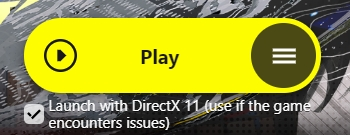
■ Method 1: Temporarily switch to DirectX 11 rendering mode to play the game
· On the GRYPHLINK launcher interface, check the [Launch with DirectX 11 (use if the game encounters issues)] option, then click [Play] to enter the game.
■ Method 2: Switch the Game Ready Driver to an older version in the NVIDIA App
· Open the NVIDIA App - [Drivers], find an older driver version, and select [Reinstall].

If you have any questions, you can visit the official Arknights: Endfield website and go to [Account Center - Contact Customer Support] to submit feedback.
Thank you once again for your continued understanding and support for Arknights: Endfield, Endministrator!